CASE STUDY
N° 001 / 003
TREEVAH — 2026
Treevah. Smarter file Navigation.
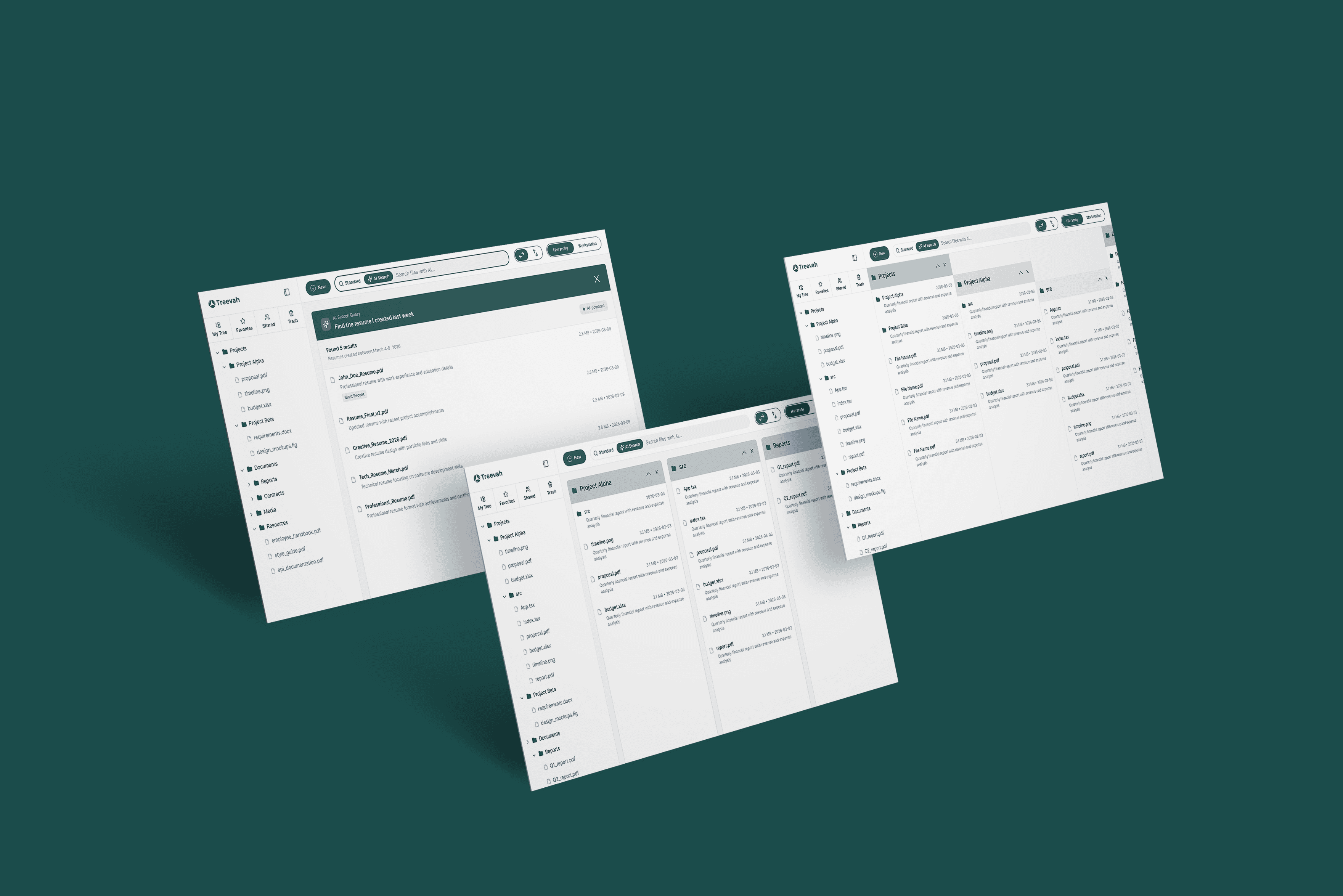
Redesigning enterprise file management with hierarchical navigation and AI-assisted organization — so users spend less time hunting for files and more time doing actual work.
ROLE
Product Designer (team of 2)
TIMELINE
3 months
PLATFORM
AI-Powered SaaS Web Platform
TEAM
1 PM
4 Engineer
01 - IMPACT
Measurable Impact across every metric.
30%
FASTER TASK COMPLETION
3X
FASTER FILE DISCOVERY
85%
USER SATISFACTION RATE
02 - CONTEXT
What existing tools get Wrong.
TRADITIONAL TOOLS
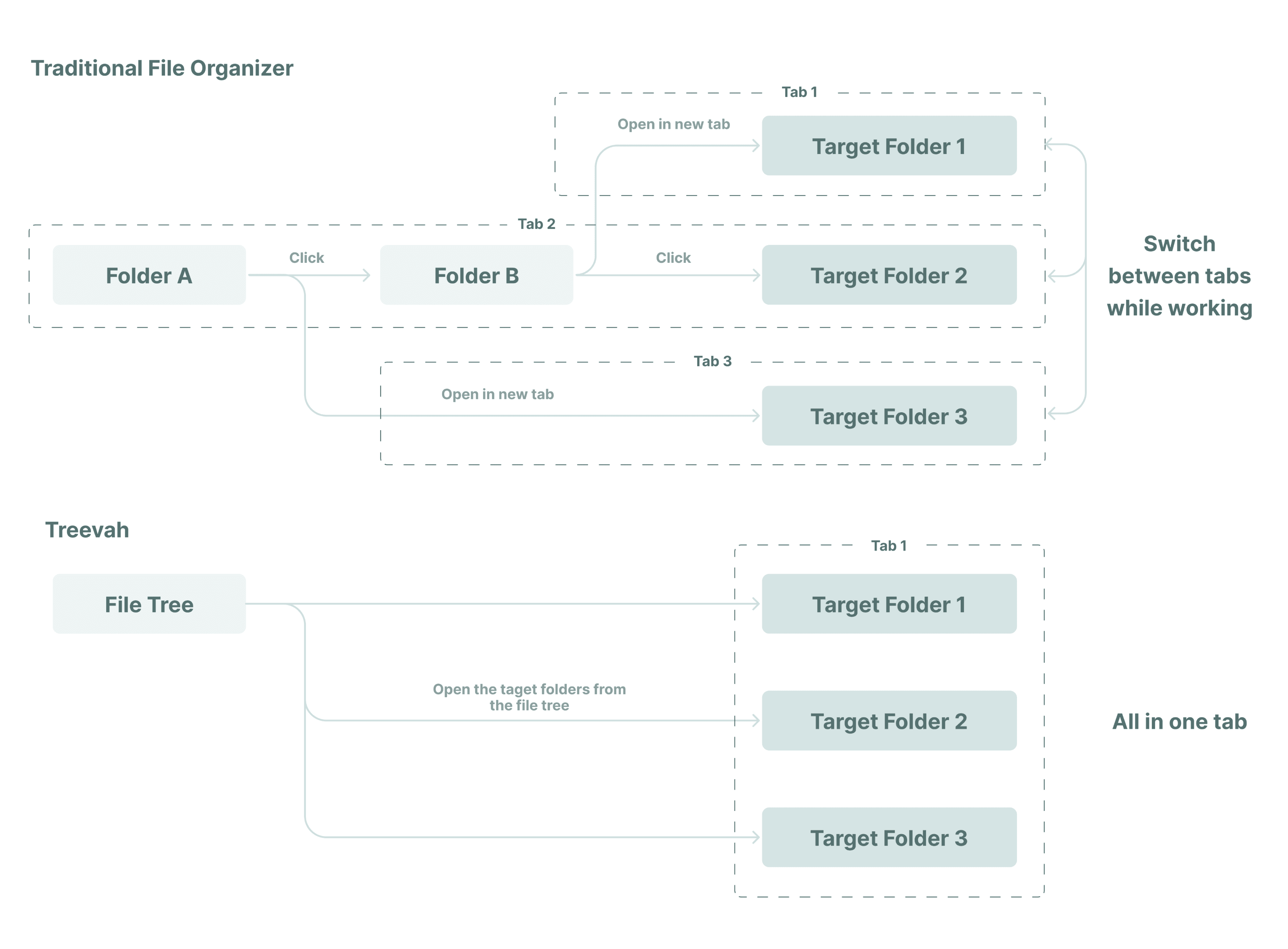
A single-column folder tree you navigate one level at a time. Switching between two folders means going back up and down again. Context is lost with every click. Work gets constantly interrupted.
TREEVAH
See the full folder structure at a glance. Navigate across folders without switching tabs. Pin only what you're working on — without disrupting the underlying organization.
03 - PREVIOUS VERSION
The alpha we Started with.
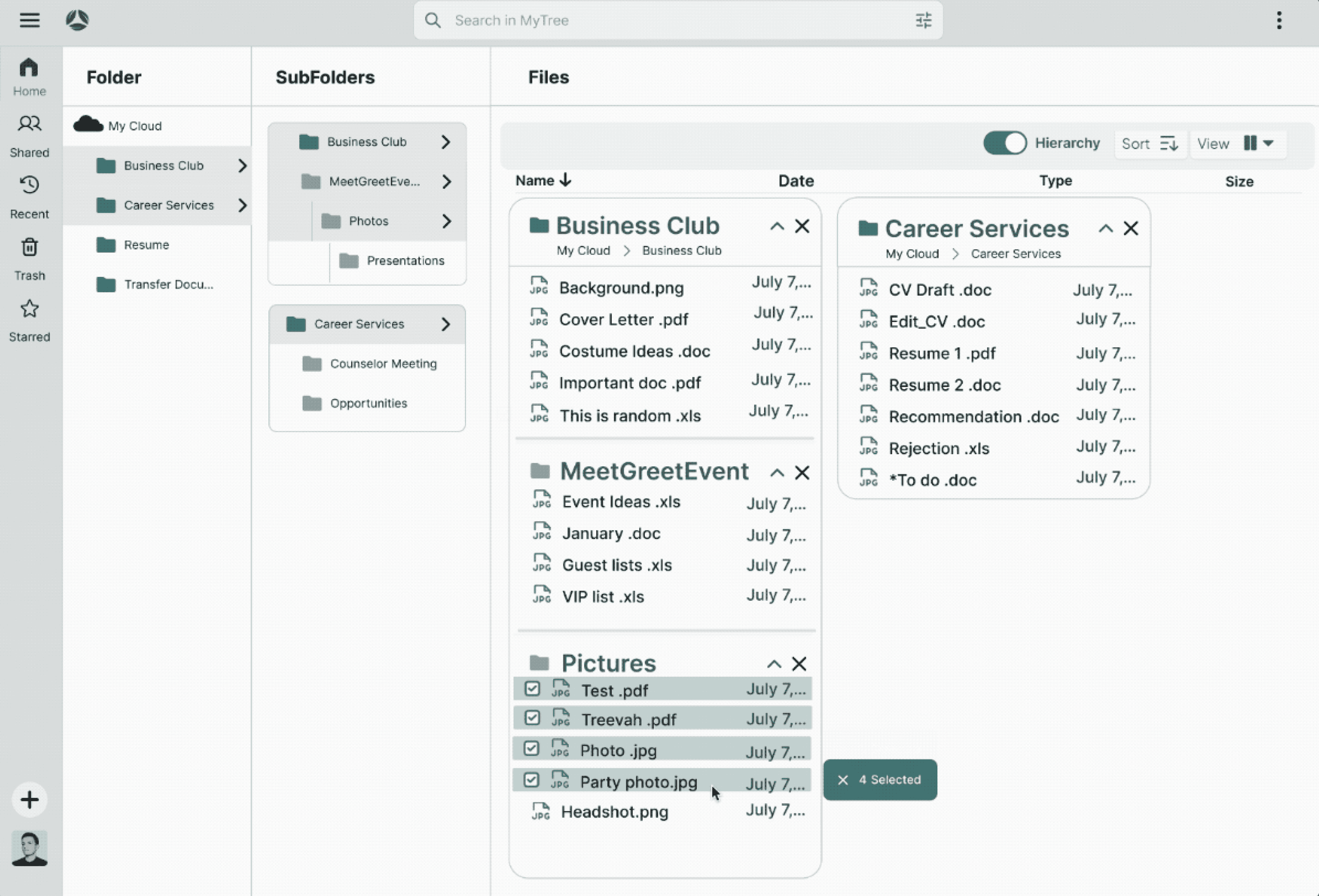
The existing version already allowed multiple folders to be displayed side-by-side — a step forward from traditional tools. But it still wasn't matching how users actually work.
04 - THE PROBLEM
The alpha solved one thing,
but Introduced Three More.
Testing revealed the alpha still didn't fit how people actually work. Three critical issues emerged.
01
Forced to open folders you don't need
The existing version already allowed multiple folders to be displayed side-by-side — a step forward from traditional tools. But it still wasn't matching how users actually work.
02
No sense of where you are
As panels accumulated side-by-side, the layout became visually noisy and hard to read. The folder structure — the whole point — was impossible to understand at a glance.
03
Search breaks down in the real world
Users frequently can't recall exact filenames or where they saved something. Keyword search failed them completely — especially for files mislabeled or dumped in the wrong folder.
05 - SOLUTION
Two Modes, one focused workspace.
Rather than a single rigid layout, Treevah offers two complementary modes — each designed around a specific workflow state.
A · HIERARCHY MODE
See your file system at A Glance.
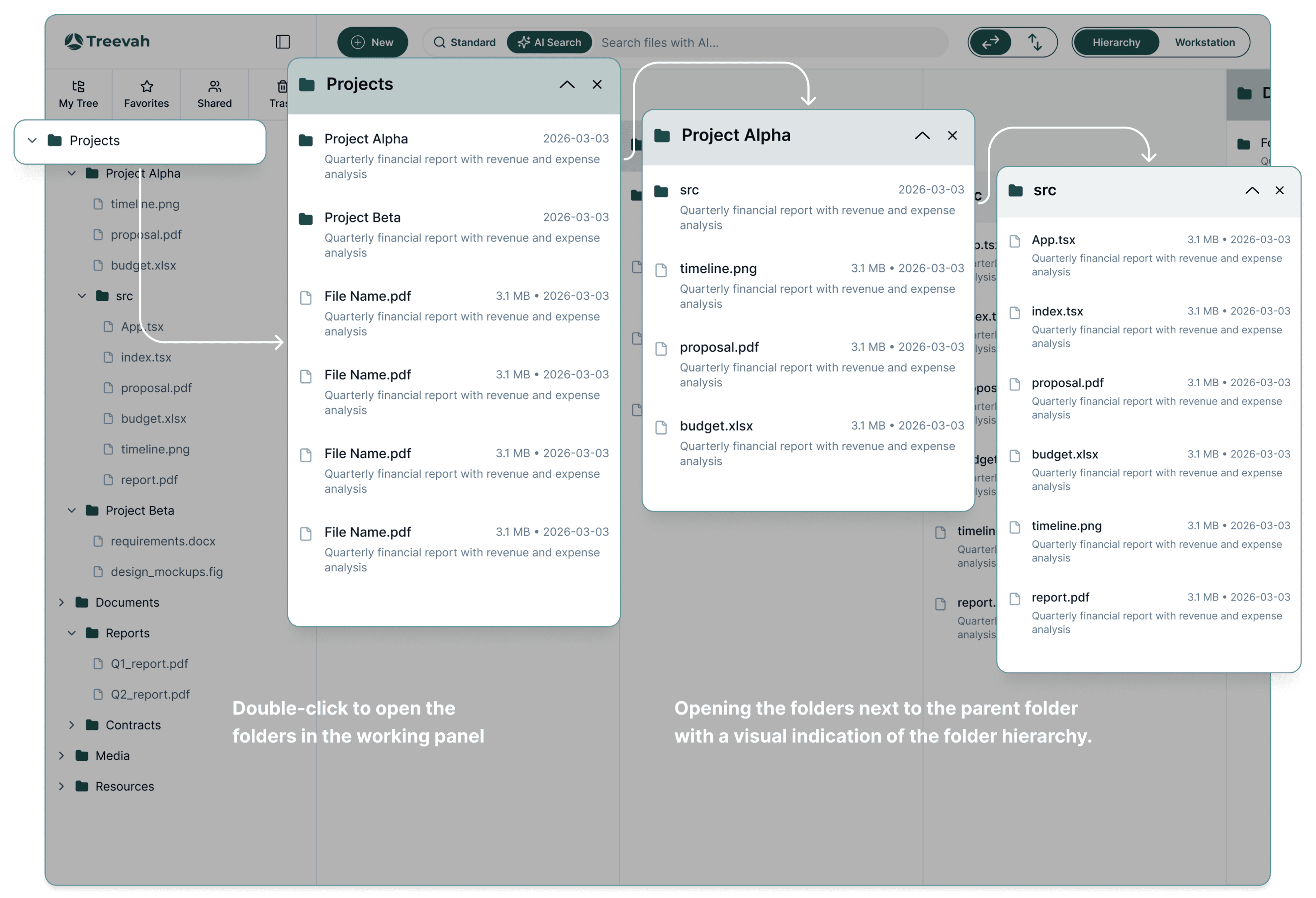
A visual tree structure that lets users understand exactly where they are in their file system. Folders expand and collapse independently — only show what you need, hide the rest.
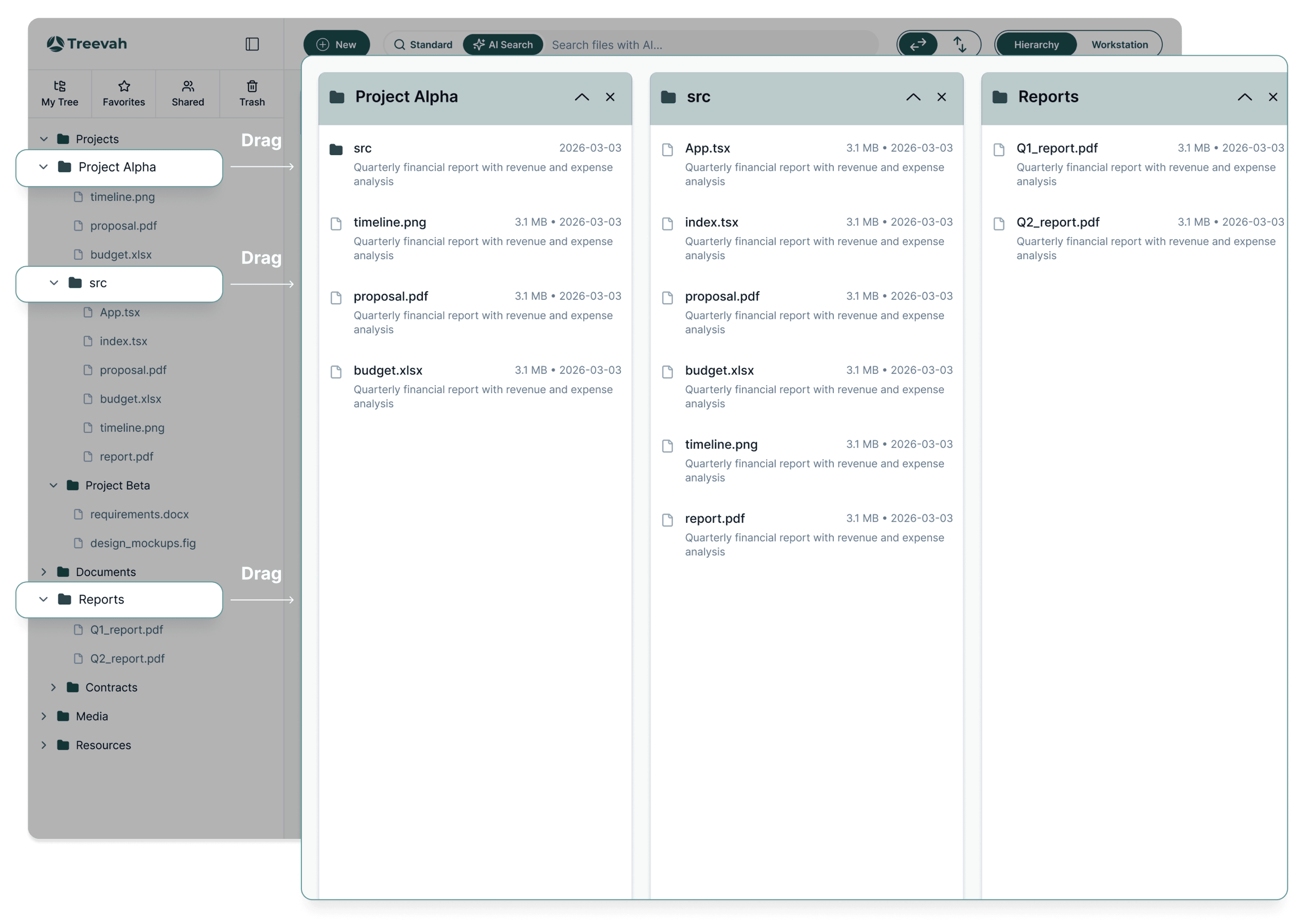
B · WORKSTATION
Pin only what you need — no reorganization.
Split-screen workspace design: a folder tree on the left, the active workspace on the right. Users drag whichever folders they currently need into the workspace—no changes to the underlying file structure required. Stay fully focused, and completely eliminate the anxiety of reorganizing.
C · AI SEARCH & SUMMARY
Query files like you'd describe them.
Natural language search that understands intent, not just filenames. Preview file contents without opening anything.
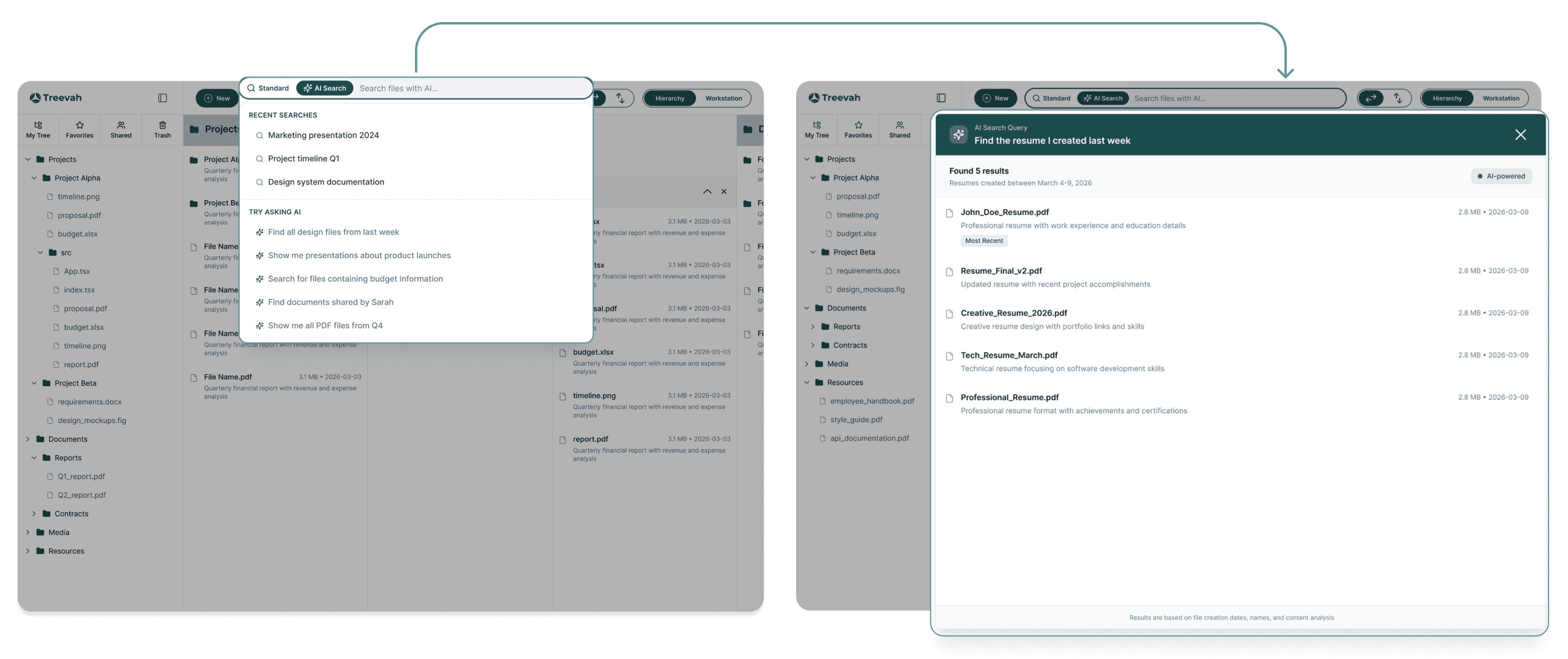
"The resume I edited yesterday"
→ Finds file named "untitled" by detecting content + edit date
"Reports for Acme Corp"
→ Surfaces files inside Acme folders tagged or matching 'report'
"PDFs from last month"
→ Returns all PDFs modified in the last 30 days
06 - RESEARCH
15+ interviews, two distinct patterns.
In-depth interviews with knowledge workers, developers, and creative professionals revealed two dominant archetypes — each with different mental models around file organization.
PERSONA 01
The Power Organizer
"I have a system. Don't touch it."
Builds meticulous folder hierarchies, rarely uses search, navigates manually. Needs deep structure with visual clarity — and control over any automated changes. Treevah's hierarchy view and manual override system directly addressed their anxiety about losing control.
PERSONA 02
The Search-First User
"I'll just search for it."
Keeps shallow folder structures, relies on memory of partial names or content keywords. Hits a wall when recall is fuzzy. Treevah's AI-powered natural language search — with content analysis, not just filenames — unlocked a new level of speed for them.
07 - USER JOURNEY
Two Paths, one system.
We mapped the two core journeys reflecting our personas — navigating directly to a known file, and searching when context is fuzzy.
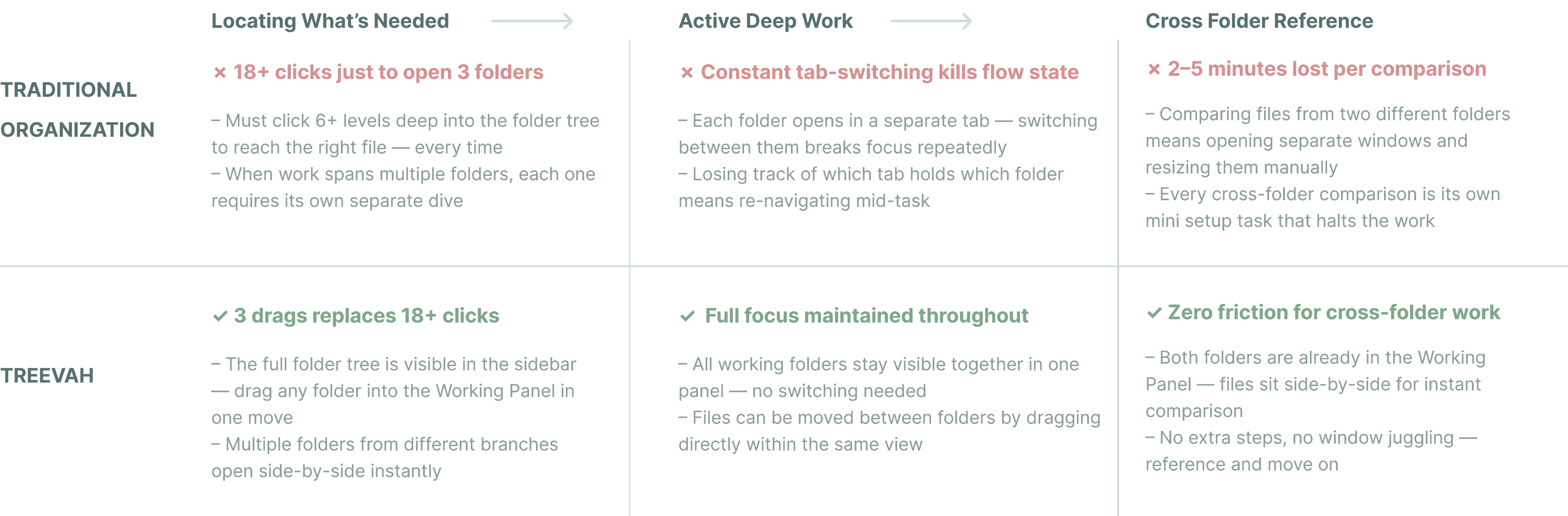
JOURNEY 01 — THE POWER ORGANIZER VS. THEIR FILES
Builds meticulous folder hierarchies · Rarely uses search · Navigates manually · Deep structured folder organization
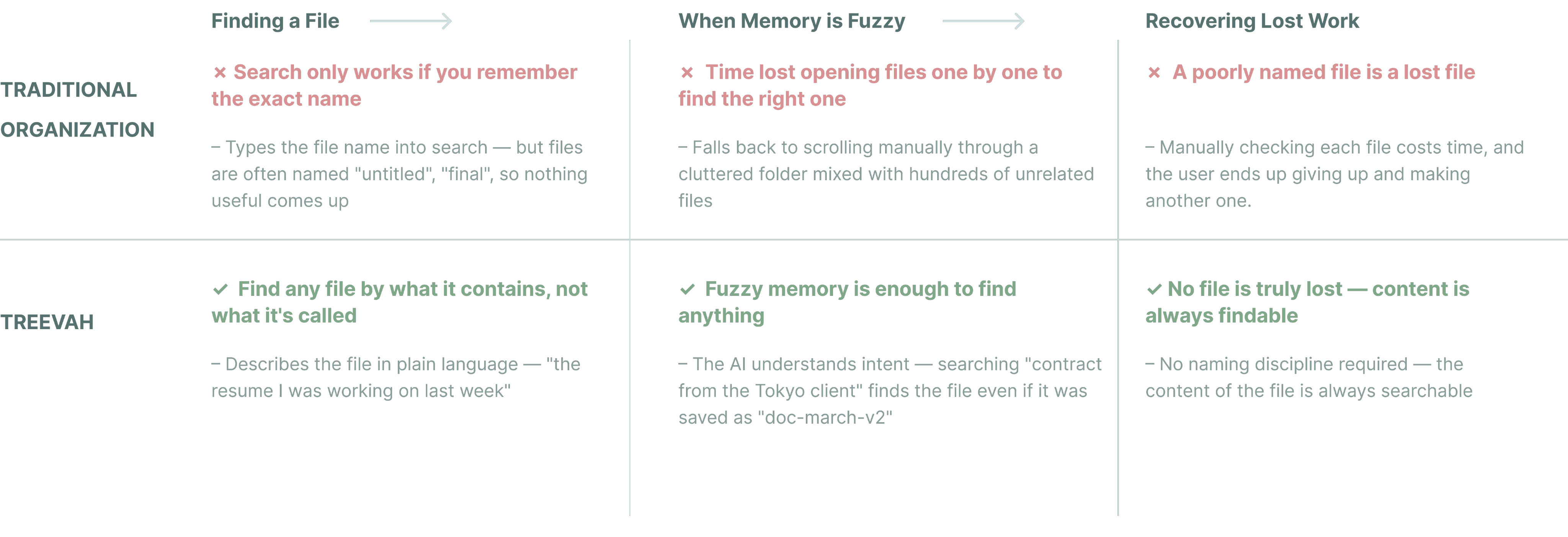
JOURNEY 02 — THE SEARCH-FIRST USER VS. THEIR FILES
Keeps shallow folder structures · Relies on memory of partial names or content keywords · Hits a wall when recall is fuzzy
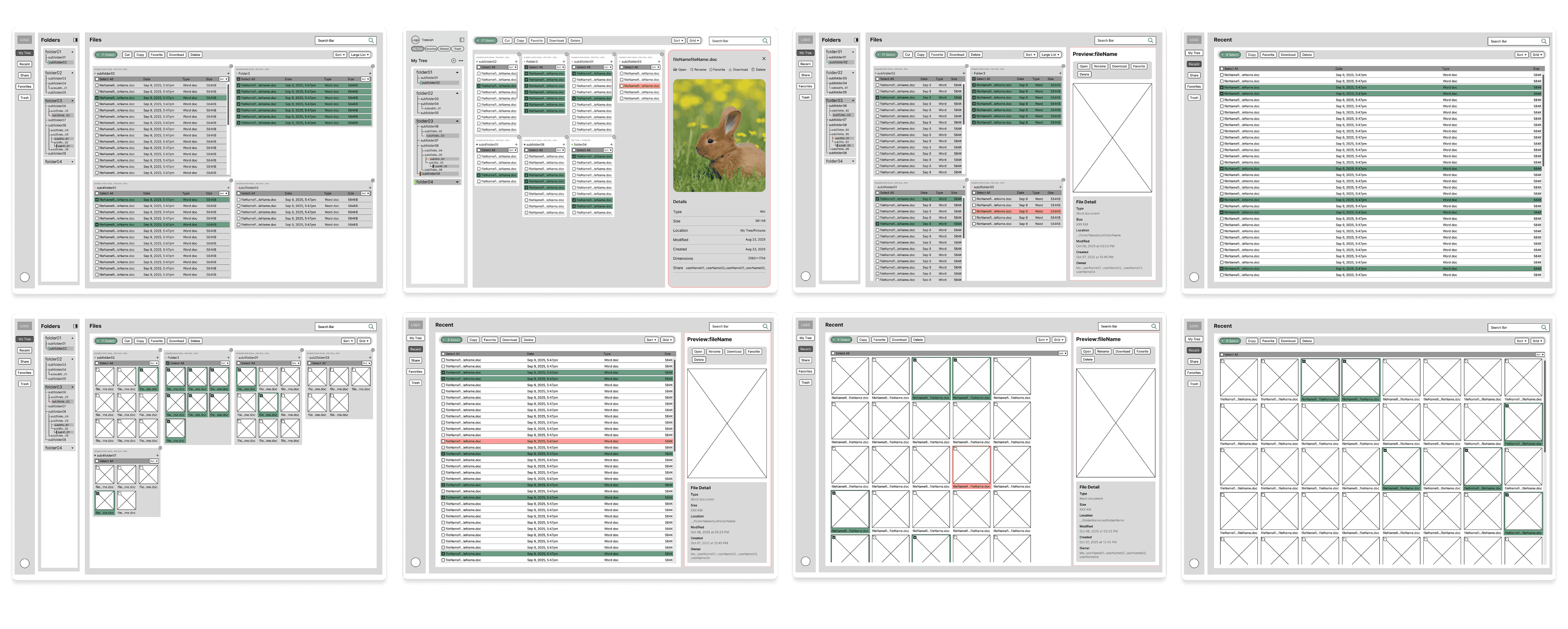
Wireframe
To find the best solution for the user flow and address key pain points, we tested several different approaches.
08 - ITERATION
What Testing changed.
Two rounds of usability testing with 8 participants surfaced critical mismatches between our design intent and how users actually interpreted the interface.
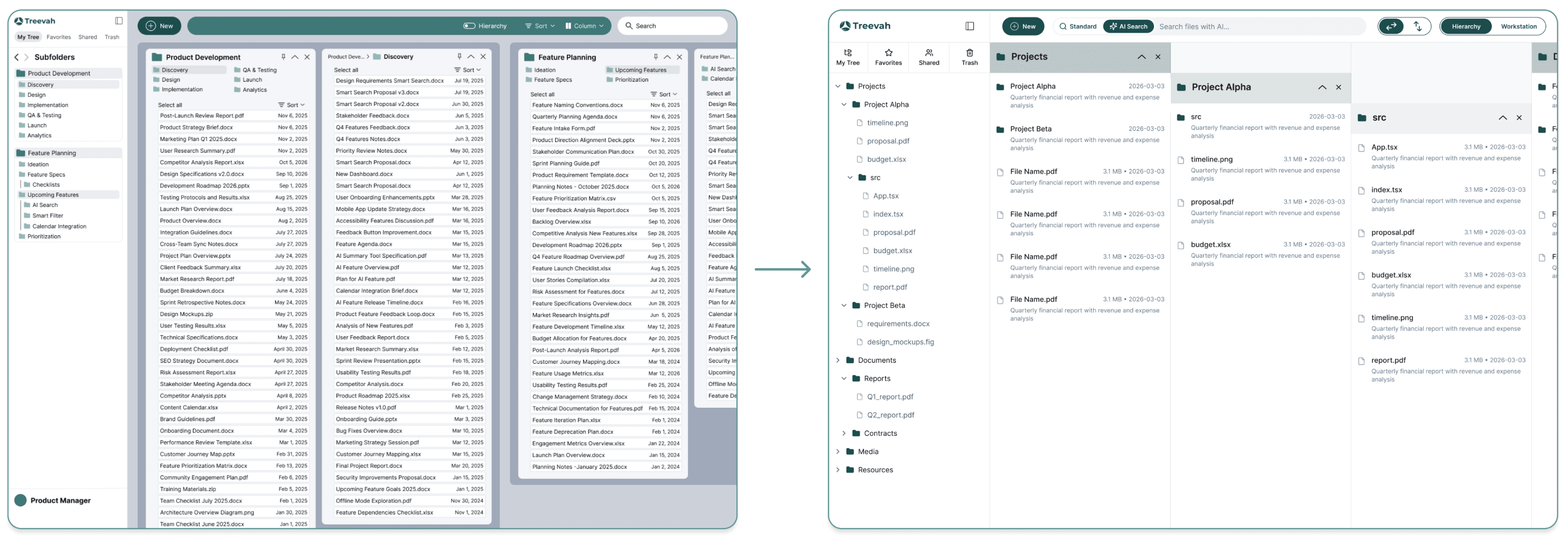
HIERARCHY MODE — VISUAL DEPTH
PROBLEM
Folder levels looked visually identical regardless of depth. Users lost track of where they were, especially with multiple branches open at once.
Fix
Added stronger visual cues between nesting levels — indentation, connecting lines, and contrast shifts — making structure immediately readable.
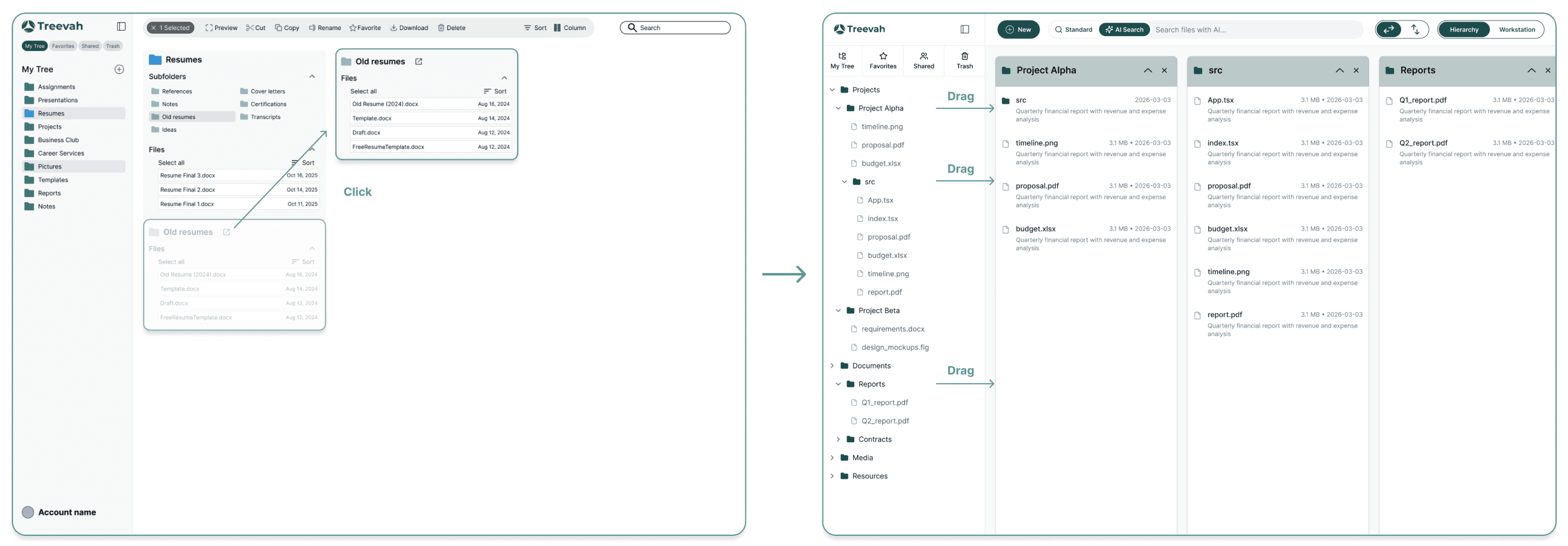
HIERARCHY MODE — PIN INTERACTION
PROBLEM
Users thought dragging a folder to the workspace would move it permanently. Isolating a single nested folder required 3+ clicks — defeating the purpose entirely.
Fix
Change "click to isolate" to a single drag of the folder into the workspace panel. Clearer interaction and visual treatment reinforce the message that the original structure remains unchanged.
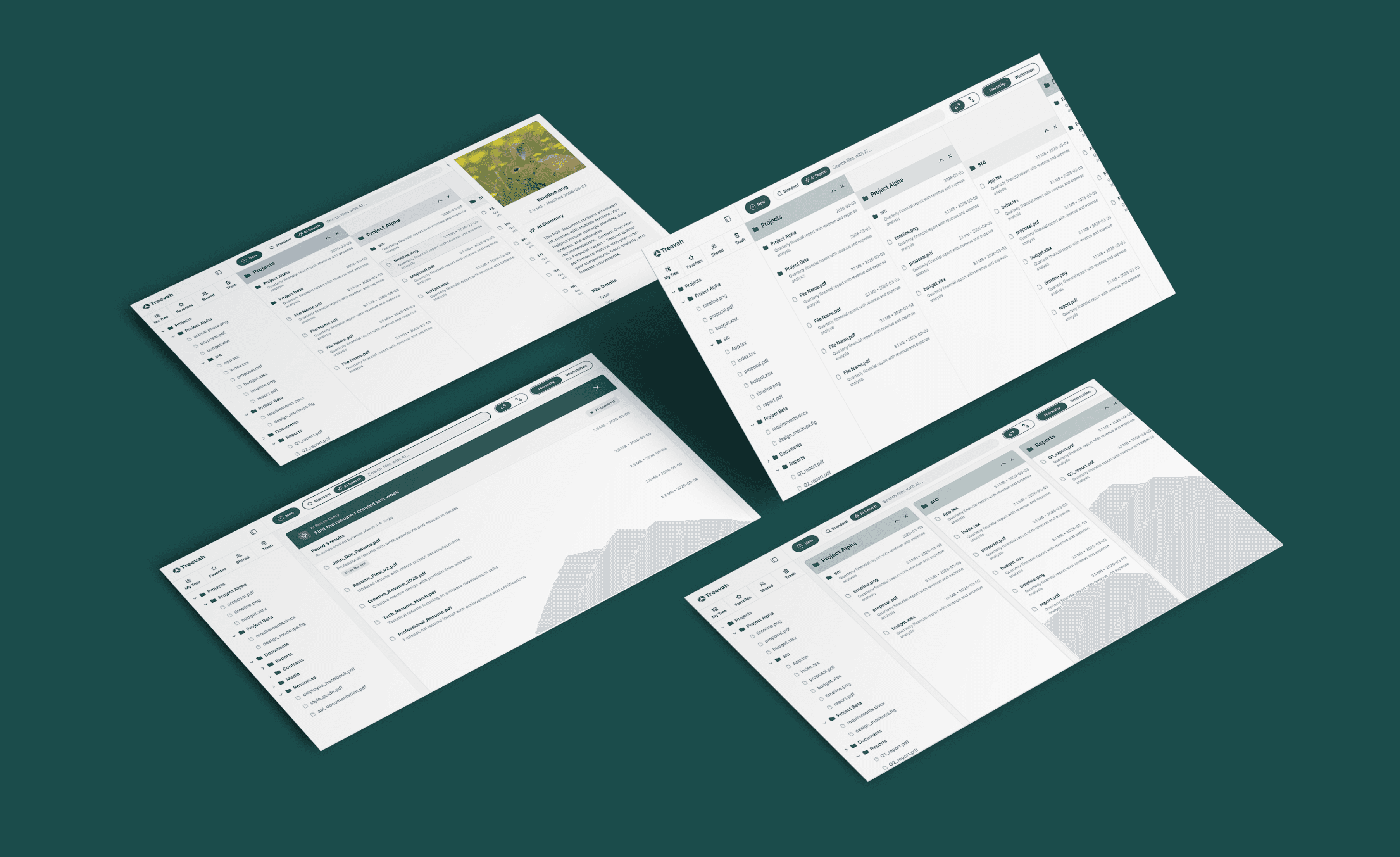
09 - THE FINAL DESIGN
The Shipped Experience.
10 — RETROSPECTIVE
What I Learned.
The biggest design challenge wasn't the interface — it was deciding what not to build. Early on, the feature list kept expanding: collaborative folders, version history, permission controls. Each idea was reasonable in isolation, but together they threatened to dilute the core value proposition. Learning to pressure-test every feature against the two personas — does this help the Power Organizer or the Search-First User right now? — became the filter that kept the project focused and shippable.
This project also reinforced that AI features require a different design standard. It's not enough for the search to return the right result; users need to immediately trust that it understood them. That meant investing heavily in how results were surfaced and explained, not just what was returned.
What's Next.
Deeper AI capabilities
Expanding beyond search into proactive features like auto-tagging files on upload, suggesting folder destinations based on content, and flagging duplicates or misplaced files before they become a problem.
Enterprise Integrations
Connecting Treevah to tools like Google Drive and Notion, so users aren't forced to choose between their existing ecosystem and a better navigation experience.
© 2026 Cici Zhong — All Rights Reserved
CICI ZHONG
CASE STUDY
N° 001 / 003
TREEVAH — 2026
Treevah. Smarter file Navigation.
Redesigning enterprise file management with hierarchical navigation and AI-assisted organization — so users spend less time hunting for files and more time doing actual work.
ROLE
Product Designer (team of 2)
TIMELINE
3 months
PLATFORM
AI-Powered SaaS Web Platform
TEAM
1 PM | 4 Engineer
01 - IMPACT
Measurable Impact across every metric.
30%
FASTER TASK COMPLETION
3X
FASTER FILE DISCOVERY
85%
USER SATISFACTION RATE
02 - CONTEXT
What existing tools get Wrong.
TRADITIONAL TOOLS
A single-column folder tree you navigate one level at a time. Switching between two folders means going back up and down again. Context is lost with every click. Work gets constantly interrupted.
TREEVAH
See the full folder structure at a glance. Navigate across folders without switching tabs. Pin only what you're working on — without disrupting the underlying organization.
03 - PREVIOUS VERSION
The alpha we Started with.
The existing version already allowed multiple folders to be displayed side-by-side — a step forward from traditional tools. But it still wasn't matching how users actually work.
04 - THE PROBLEM
The alpha solved one thing,
but Introduced Three More.
Testing revealed the alpha still didn't fit how people actually work. Three critical issues emerged.
01
Forced to open folders you don't need
The existing version already allowed multiple folders to be displayed side-by-side — a step forward from traditional tools. But it still wasn't matching how users actually work.
02
No sense of where you are
As panels accumulated side-by-side, the layout became visually noisy and hard to read. The folder structure — the whole point — was impossible to understand at a glance.
03
Search breaks down in the real world
Users frequently can't recall exact filenames or where they saved something. Keyword search failed them completely — especially for files mislabeled or dumped in the wrong folder.
05 - SOLUTION
Two Modes, one focused workspace.
Rather than a single rigid layout, Treevah offers two complementary modes — each designed around a specific workflow state.
A · HIERARCHY MODE
See your file system at A Glance.
A visual tree structure that lets users understand exactly where they are in their file system. Folders expand and collapse independently — only show what you need, hide the rest.
B · WORKSTATION
Pin only what you need — no reorganization.
Split-screen workspace design: a folder tree on the left, the active workspace on the right. Users drag whichever folders they currently need into the workspace—no changes to the underlying file structure required. Stay fully focused, and completely eliminate the anxiety of reorganizing.
C · AI SEARCH & SUMMARY
Query files like you'd describe them.
Natural language search that understands intent, not just filenames. Preview file contents without opening anything.
"The resume I edited yesterday"
→ Finds file named "untitled" by detecting content + edit date
"Reports for Acme Corp"
→ Surfaces files inside Acme folders tagged or matching 'report'
"PDFs from last month"
→ Returns all PDFs modified in the last 30 days
06 - RESEARCH
15+ interviews, two distinct patterns.
In-depth interviews with knowledge workers, developers, and creative professionals revealed two dominant archetypes — each with different mental models around file organization.
PERSONA 01
The Power Organizer
"I have a system. Don't touch it."
Builds meticulous folder hierarchies, rarely uses search, navigates manually. Needs deep structure with visual clarity — and control over any automated changes. Treevah's hierarchy view and manual override system directly addressed their anxiety about losing control.
PERSONA 02
The Search-First User
"I'll just search for it."
Keeps shallow folder structures, relies on memory of partial names or content keywords. Hits a wall when recall is fuzzy. Treevah's AI-powered natural language search — with content analysis, not just filenames — unlocked a new level of speed for them.
07 - USER JOURNEY
Two Paths, one system.
We mapped the two core journeys reflecting our personas — navigating directly to a known file, and searching when context is fuzzy.
JOURNEY 01 — THE POWER ORGANIZER VS. THEIR FILES
Builds meticulous folder hierarchies · Rarely uses search · Navigates manually · Deep structured folder organization
JOURNEY 02 — THE SEARCH-FIRST USER VS. THEIR FILES
Keeps shallow folder structures · Relies on memory of partial names or content keywords · Hits a wall when recall is fuzzy
Wireframe
To find the best solution for the user flow and address key pain points, we tested several different approaches.
08 - ITERATION
What Testing changed.
Two rounds of usability testing with 8 participants surfaced critical mismatches between our design intent and how users actually interpreted the interface.
HIERARCHY MODE — VISUAL DEPTH
PROBLEM
Folder levels looked visually identical regardless of depth. Users lost track of where they were, especially with multiple branches open at once.
Fix
Added stronger visual cues between nesting levels — indentation, connecting lines, and contrast shifts — making structure immediately readable.
HIERARCHY MODE — PIN INTERACTION
PROBLEM
Users thought dragging a folder to the workspace would move it permanently. Isolating a single nested folder required 3+ clicks — defeating the purpose entirely.
Fix
Change "click to isolate" to a single drag of the folder into the workspace panel. Clearer interaction and visual treatment reinforce the message that the original structure remains unchanged.
09 - THE FINAL DESIGN
The Shipped Experience.
10 — RETROSPECTIVE
What I Learned.
The biggest design challenge wasn't the interface — it was deciding what not to build. Early on, the feature list kept expanding: collaborative folders, version history, permission controls. Each idea was reasonable in isolation, but together they threatened to dilute the core value proposition. Learning to pressure-test every feature against the two personas — does this help the Power Organizer or the Search-First User right now? — became the filter that kept the project focused and shippable.
This project also reinforced that AI features require a different design standard. It's not enough for the search to return the right result; users need to immediately trust that it understood them. That meant investing heavily in how results were surfaced and explained, not just what was returned.
What's Next.
Deeper AI capabilities
Expanding beyond search into proactive features like auto-tagging files on upload, suggesting folder destinations based on content, and flagging duplicates or misplaced files before they become a problem.
Enterprise Integrations
Connecting Treevah to tools like Google Drive and Notion, so users aren't forced to choose between their existing ecosystem and a better navigation experience.
© 2026 Cici Zhong — All Rights Reserved
CASE STUDY
N° 001 / 003
TREEVAH — 2026
Treevah. Smarter file Navigation.
Redesigning enterprise file management with hierarchical navigation and AI-assisted organization — so users spend less time hunting for files and more time doing actual work.
ROLE
Product Designer (team of 2)
TIMELINE
3 months
PLATFORM
AI-Powered SaaS Web Platform
TEAM
1 PM
4 Engineer
01 - IMPACT
Measurable Impact across every metric.
30%
FASTER TASK COMPLETION
3X
FASTER FILE DISCOVERY
85%
USER SATISFACTION RATE
02 - CONTEXT
What existing tools get Wrong.
TRADITIONAL TOOLS
A single-column folder tree you navigate one level at a time. Switching between two folders means going back up and down again. Context is lost with every click. Work gets constantly interrupted.
TREEVAH
See the full folder structure at a glance. Navigate across folders without switching tabs. Pin only what you're working on — without disrupting the underlying organization.
03 - PREVIOUS VERSION
The alpha we Started with.
The existing version already allowed multiple folders to be displayed side-by-side — a step forward from traditional tools. But it still wasn't matching how users actually work.
04 - THE PROBLEM
The alpha solved one thing,
but Introduced Three More.
Testing revealed the alpha still didn't fit how people actually work. Three critical issues emerged.
01
Forced to open folders you don't need
The existing version already allowed multiple folders to be displayed side-by-side — a step forward from traditional tools. But it still wasn't matching how users actually work.
02
No sense of where you are
As panels accumulated side-by-side, the layout became visually noisy and hard to read. The folder structure — the whole point — was impossible to understand at a glance.
03
Search breaks down in the real world
Users frequently can't recall exact filenames or where they saved something. Keyword search failed them completely — especially for files mislabeled or dumped in the wrong folder.
05 - SOLUTION
Two Modes, one focused workspace.
Rather than a single rigid layout, Treevah offers two complementary modes — each designed around a specific workflow state.
A · HIERARCHY MODE
See your file system at A Glance.
A visual tree structure that lets users understand exactly where they are in their file system. Folders expand and collapse independently — only show what you need, hide the rest.
B · WORKSTATION
Pin only what you need — no reorganization.
Split-screen workspace design: a folder tree on the left, the active workspace on the right. Users drag whichever folders they currently need into the workspace—no changes to the underlying file structure required. Stay fully focused, and completely eliminate the anxiety of reorganizing.
C · AI SEARCH & SUMMARY
Query files like you'd describe them.
Natural language search that understands intent, not just filenames. Preview file contents without opening anything.
"The resume I edited yesterday"
→ Finds file named "untitled" by detecting content + edit date
"Reports for Acme Corp"
→ Surfaces files inside Acme folders tagged or matching 'report'
"PDFs from last month"
→ Returns all PDFs modified in the last 30 days
06 - RESEARCH
15+ interviews, two distinct patterns.
In-depth interviews with knowledge workers, developers, and creative professionals revealed two dominant archetypes — each with different mental models around file organization.
PERSONA 01
The Power Organizer
"I have a system. Don't touch it."
Builds meticulous folder hierarchies, rarely uses search, navigates manually. Needs deep structure with visual clarity — and control over any automated changes. Treevah's hierarchy view and manual override system directly addressed their anxiety about losing control.
PERSONA 02
The Search-First User
"I'll just search for it."
Keeps shallow folder structures, relies on memory of partial names or content keywords. Hits a wall when recall is fuzzy. Treevah's AI-powered natural language search — with content analysis, not just filenames — unlocked a new level of speed for them.
07 - USER JOURNEY
Two Paths, one system.
We mapped the two core journeys reflecting our personas — navigating directly to a known file, and searching when context is fuzzy.
JOURNEY 01 — THE POWER ORGANIZER VS. THEIR FILES
Builds meticulous folder hierarchies · Rarely uses search · Navigates manually · Deep structured folder organization
JOURNEY 02 — THE SEARCH-FIRST USER VS. THEIR FILES
Keeps shallow folder structures · Relies on memory of partial names or content keywords · Hits a wall when recall is fuzzy
Wireframe
To find the best solution for the user flow and address key pain points, we tested several different approaches.
08 - ITERATION
What Testing changed.
Two rounds of usability testing with 8 participants surfaced critical mismatches between our design intent and how users actually interpreted the interface.
HIERARCHY MODE — VISUAL DEPTH
PROBLEM
Folder levels looked visually identical regardless of depth. Users lost track of where they were, especially with multiple branches open at once.
Fix
Added stronger visual cues between nesting levels — indentation, connecting lines, and contrast shifts — making structure immediately readable.
HIERARCHY MODE — PIN INTERACTION
PROBLEM
Users thought dragging a folder to the workspace would move it permanently. Isolating a single nested folder required 3+ clicks — defeating the purpose entirely.
Fix
Change "click to isolate" to a single drag of the folder into the workspace panel. Clearer interaction and visual treatment reinforce the message that the original structure remains unchanged.
09 - THE FINAL DESIGN
The Shipped Experience.
10 — RETROSPECTIVE
What I Learned.
The biggest design challenge wasn't the interface — it was deciding what not to build. Early on, the feature list kept expanding: collaborative folders, version history, permission controls. Each idea was reasonable in isolation, but together they threatened to dilute the core value proposition. Learning to pressure-test every feature against the two personas — does this help the Power Organizer or the Search-First User right now? — became the filter that kept the project focused and shippable.
This project also reinforced that AI features require a different design standard. It's not enough for the search to return the right result; users need to immediately trust that it understood them. That meant investing heavily in how results were surfaced and explained, not just what was returned.
What's Next.
Deeper AI capabilities
Expanding beyond search into proactive features like auto-tagging files on upload, suggesting folder destinations based on content, and flagging duplicates or misplaced files before they become a problem.
Enterprise Integrations
Connecting Treevah to tools like Google Drive and Notion, so users aren't forced to choose between their existing ecosystem and a better navigation experience.
© 2026 Cici Zhong — All Rights Reserved